Modern development and product teams work daily with a wide variety of data objects, technologies, and components. As a result, the ability to quickly find, structure, and collaboratively use relevant information is becoming increasingly important. This is exactly where the new Watchlist feature in the iTEM Pool comes into play.
With Watchlists, CALIDAT enhances the iTEM Pool with a personal yet collaborative workspace. Users can create individual collections, keep track of important iTEMs, and flexibly organize their working view – fully integrated into the existing platform.
Structured Collections for Greater Clarity
The Watchlist feature allows users to create any number of personal lists and name them individually – for example, for project-related components, critical technologies, or personal favorites. Each Watchlist is assigned to a specific iTEM type and can be modified or deleted at any time.
This creates a clear and intuitive structure within the iTEM Pool, significantly simplifying quick access to relevant information.
Intelligently Organize iTEMs
Directly from the iTEM Pool, individual or multiple iTEMs can be conveniently added to a Watchlist with just a few clicks. Users can either select an existing list or create a new collection instantly. Removing iTEMs is just as simple. An integrated preview additionally supports users during the assignment process.
This makes the management of relevant data objects fast, intuitive, and efficient.
Use Multiple Watchlists Simultaneously as Filters
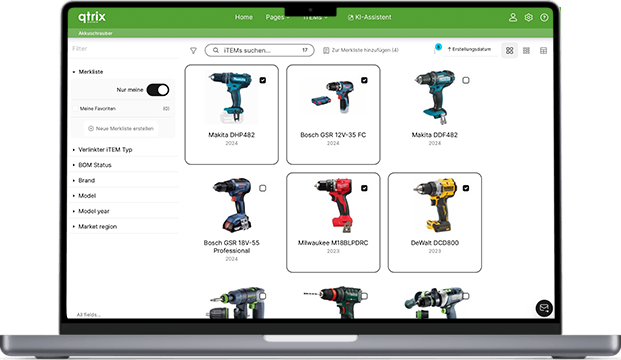
One of the key strengths of the new feature is the multi-watchlist filter. Users can activate several Watchlists at the same time and display only the iTEMs that are included in at least one of these lists within the iTEM Pool.
This allows complex datasets to be reduced to relevant content without requiring time-consuming manual filter configurations. An integrated badge always transparently displays how many Watchlists are currently active.
Simplifying Team Collaboration
In addition to personal collections, the Watchlist feature also supports cross-team collaboration. Watchlists can be shared with specific users or published as public collections. This enables central reference lists, shared project overviews, or curated technology collections.
The underlying permission concept ensures clear responsibilities:
* Owners have full management control over the Watchlist
* Shared users can add or remove content
* Public Watchlists are available to all users in read-only mode
This combines flexibility with controlled collaboration.
Seamless Integration into Existing Workflows
The Watchlists are fully integrated into the existing iTEM Pool. A dedicated section within the filter panel enables quick activation of relevant lists, while specialized toolbar functions support the direct assignment of iTEMs. Additional icons and tooltips provide transparency regarding ownership, sharing, and visibility.
At the same time, the user interface remains intentionally clean and intuitive – without interrupting existing workflows.
Typical Use Cases
The Watchlist feature enables numerous practical applications:
* Personal watchlists for products requiring revision
* Public technology reference lists
* Shared project and component overviews
* Comparative views across multiple thematic collections
As a result, the iTEM Pool becomes not only more structured, but also significantly more productive in day-to-day use.
Conclusion
With the new Watchlist feature, the iTEM Pool continues to evolve into an even more personal, collaborative, and efficient workspace. Users gain faster access to relevant information, teams benefit from improved collaboration, and complex datasets become easier to manage.
Watchlists provide exactly the transparency and flexibility that modern development and product processes require today.