
Finding answers when you need them: The QTRIX Help offers two new features. An AI assistant answers questions in your own words directly from the documentation, with source references. And short video tutorials show step by step how to set up QTRIX features yourself.
Find faster. Understand more easily. Work more independently.
Saving a filter, customizing a dashboard, setting up a workflow: Until now, finding the right setting meant going through the chapters of the online help.
Now there are two more ways: You can ask your question directly, or have the setup shown to you in a video.
Everything in One Place
The Help home page leads to three areas: Online Help, Release Notes, and Video Tutorials. The Online Help ranges from terms and basics to data view, data entry, and dashboards, all the way to administration.
The search finds content even if your terms don't exactly match those in the documentation. All content is available in German and English.
Just ask
New is the AI assistant. Ask your question in your own words, e.g. "How do I save a filter in the iTEM pool?". The assistant answers from the QTRIX documentation and names the sources its answer is based on. That way, you can always read up on the relevant page.
You can reach the assistant on every page of the Help via "Assistant" at the top right or "Ask assistant" at the bottom right.
Watch instead of reading
Also new is the Video Tutorials area. Short explainer videos show step by step how to set up and configure features yourself. To start, videos are available in these areas:
- Getting started & navigation: e.g. "Getting Started in QTRIX", "What Is an iTEM?", "Setting Up My Workspace"
- Finding & organizing data: e.g. "iTEM Pool: Setting Up and Saving Filters", "iTEM Import from Excel/JSON"
- Forms, pages & automation: e.g. "Form Designer", "Setting Up Automations"
- Add-on modules: "QTRIX Workflow – Creating and Configuring Workflows"
- What's new: "New in QTRIX v26.3"
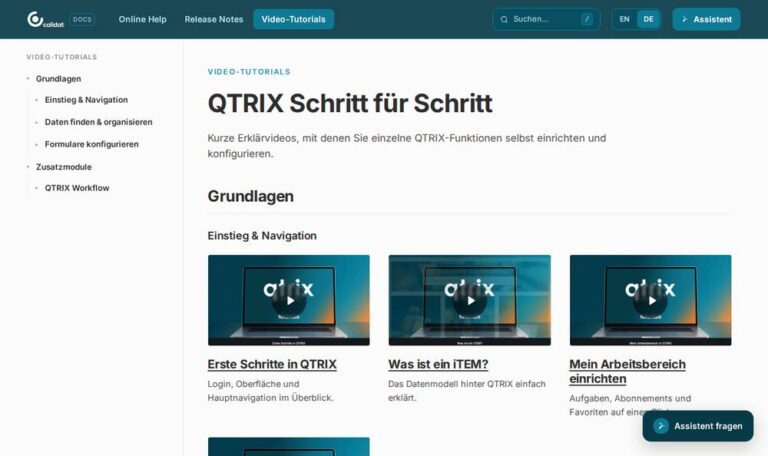
An orientation for beginners – a reference for experts
New users quickly find their way into QTRIX with the basics videos. Experienced users and administrators use the detailed Online Help pages, for example on workflows, automations, forms, or SSO, and ask the assistant about individual settings. All new features of each version are documented in the Release Notes.
Typical Use Cases
The QTRIX Help supports you throughout your everyday work with QTRIX:
- Onboarding new users with the basics videos
- Questions to the AI assistant in your own words, with source references
- Setting up individual features step by step in video
- Configuration of workflows, automations, and forms by administrators
- Overview of all new features in the Release Notes
Conclusion
The QTRIX Help adds two ways to an answer to the Online Help: the AI assistant, which answers questions directly from the documentation, and video tutorials that show the setup step by step.