Well, it’s not actually that new…
… but we repeatedly notice that this feature is not yet known to all users. Therefore, we would like to briefly introduce it here: the calendar widget in QTRIX.
Clear representation of time-related information
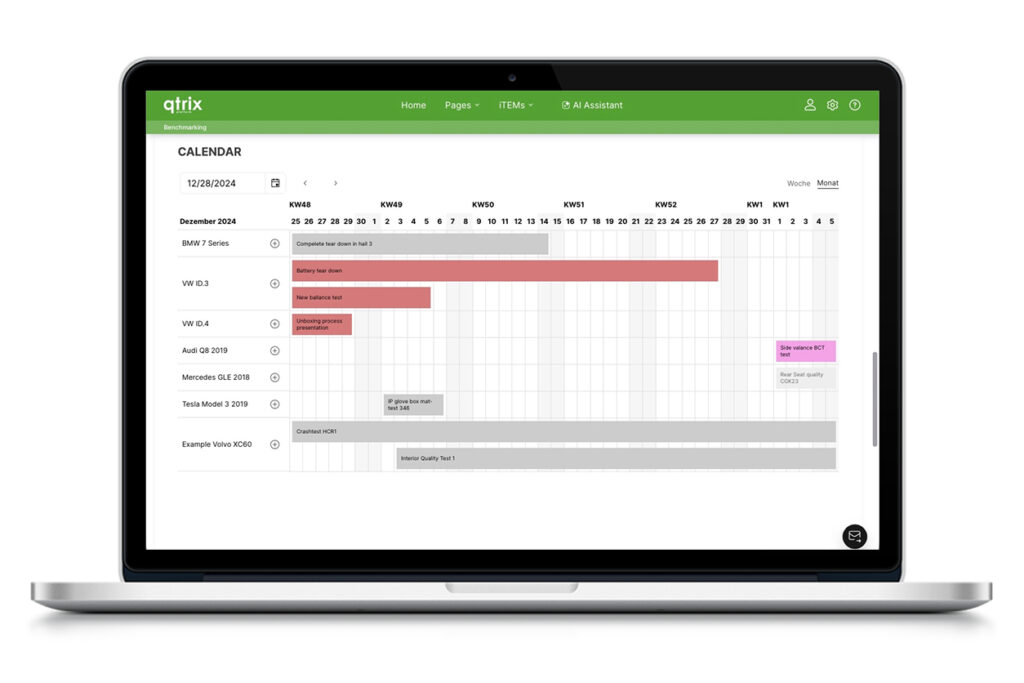
The calendar widget provides a clear way to display time-relevant information directly within the QTRIX platform. It is particularly useful for managing upcoming inspections or tests of machines, vehicles, or components. Time periods, appointments, and workflows are visually presented in the calendar and can be quickly comprehended.
Efficient management of appointments and objects
Furthermore, the widget is suitable for displaying availability as well as the chronological sequence of tests, projects, vehicles, machines, or similar objects. Entries can be opened and edited directly from the calendar interface. This saves time and makes the calendar widget a valuable tool within the QTRIX database.
Flexible use across pages and use cases
Another advantage is its high flexibility: the calendar widget can be activated on any page. It is also possible to use multiple calendars in parallel—for example, separated by departments or specific use cases.
Simple structuring of time-controlled processes
For those who have not yet implemented the calendar widget, this provides a simple and transparent way to structure and centrally display time-based processes.