Getting Started Is Easy
In QTRIX, you define the features or components to be recognized. With only a few annotated sample images, the system can be trained – and it learns remarkably quickly. After a short time, the AI is able to identify new components independently and with high precision.
From Image to Structured BOM
Once all elements – for example, of a printed circuit board – are captured, AI Studio also analyzes further details such as logos, serial numbers, or technical markings. This information is automatically assigned to the appropriate data fields. With a single click, you can generate a complete, structured BOM in your QTRIX database – ready for comparison with existing BOMs or for subsequent function and cost analysis.
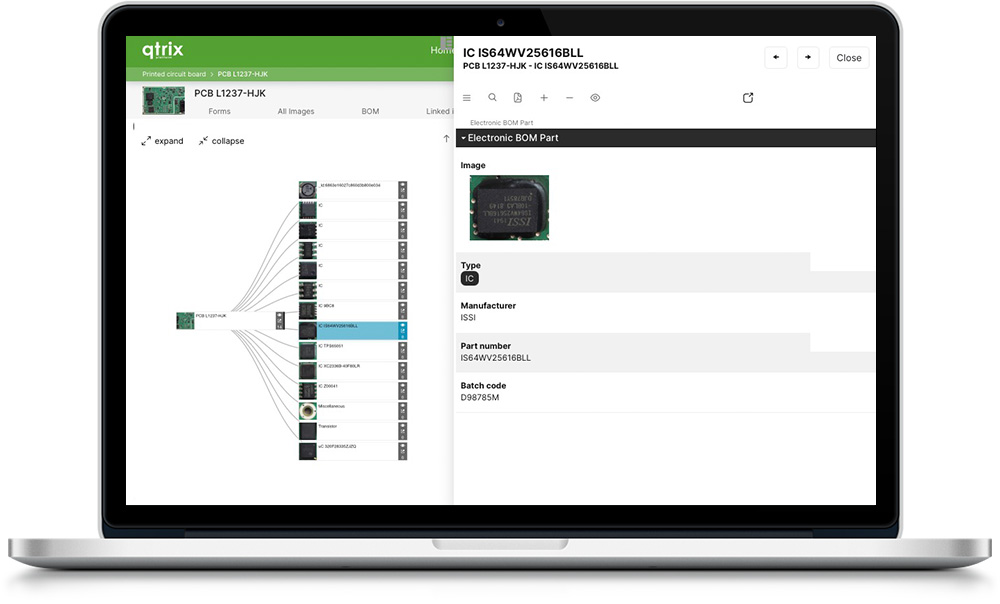
Seamless Integration into QTRIX
The automatically generated BOM can be processed directly within your QTRIX database:
• Compare BOMs with each other
• Evaluate function costs
• Derive optimization potential
More Than Just Circuit Boards – Versatile Applications
AI Studio goes far beyond analyzing circuit boards. The technology is equally suitable for mechanical assemblies, electronic devices, packaging, technical drawings, or product images in the after-sales environment – anywhere visual data needs to be structured and automatically evaluated.