
Value analysis.
Finally in one place.
From customer requirement to approved solution concept – end-to-end, traceable and supported by AI that you control.
Value analysis is demanding.
Your tools shouldn’t be.
Dozens of files, weightings calculated by hand, lost versions. ValueTracker keeps the thread together.
Until now
- Excel, PowerPoint and e-mails
- Weightings calculated by hand
- Costs per component
- Competitor data in separate files
- Savings in side calculations
- Decisions hard to trace
With ValueTracker
- One shared data basis
- Pairwise comparison with automatic weighting
- Costs per function
- Competitor comparison per requirement in the same project
- Savings and payback per solution concept
- Traceable all the way to the concept
Methodically sound. Without stacks of forms.
Value analysis according to VDI 2800 and DIN EN 12973 in five phases. Each phase builds on the results of the previous one – and everything recalculates automatically.
VDI 2800DIN EN 12973VDI 2803
Understand the customer
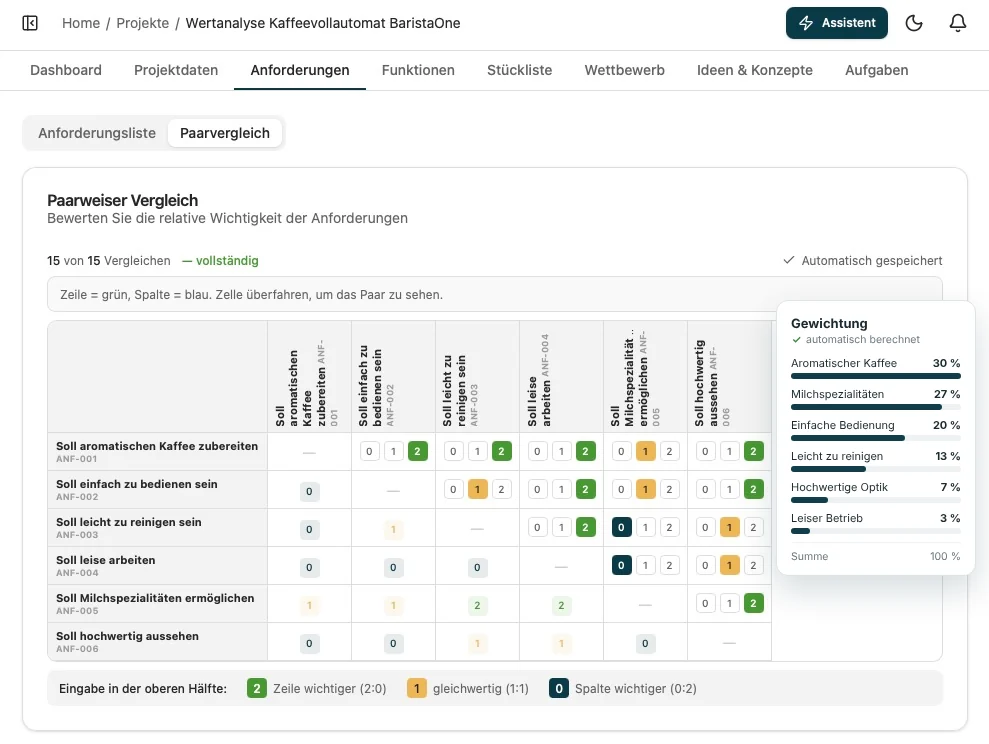
Capture requirements, select them for the analysis and weight them automatically by pairwise comparison.
Source and priorityPairwise comparisonWeighting in %
Analyze functions
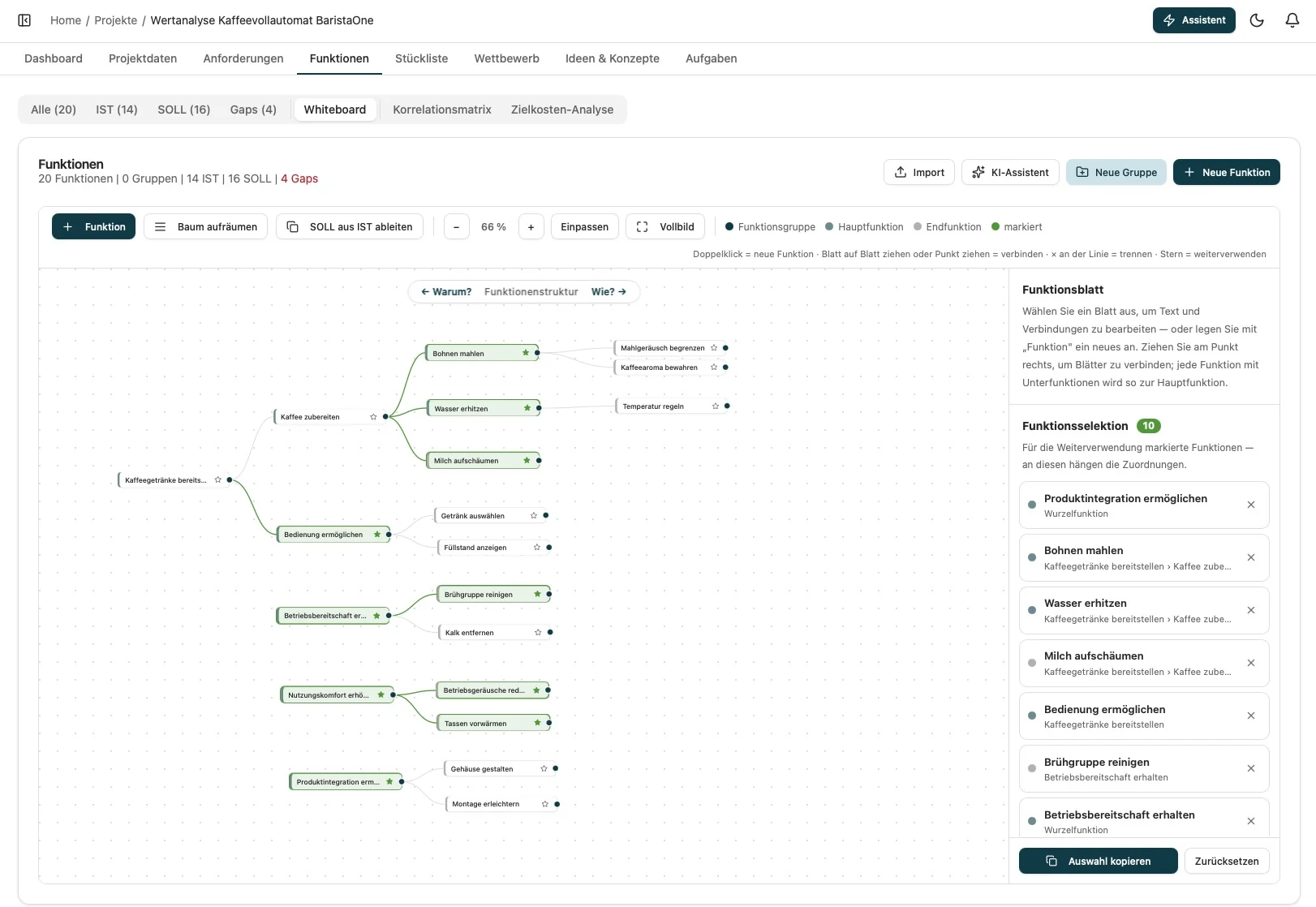
Build the function tree on the whiteboard, compare AS-IS and TO-BE, spot gaps and derive target costs per function.
Function whiteboardCorrelation matrixGap analysisTarget costs
Allocate costs
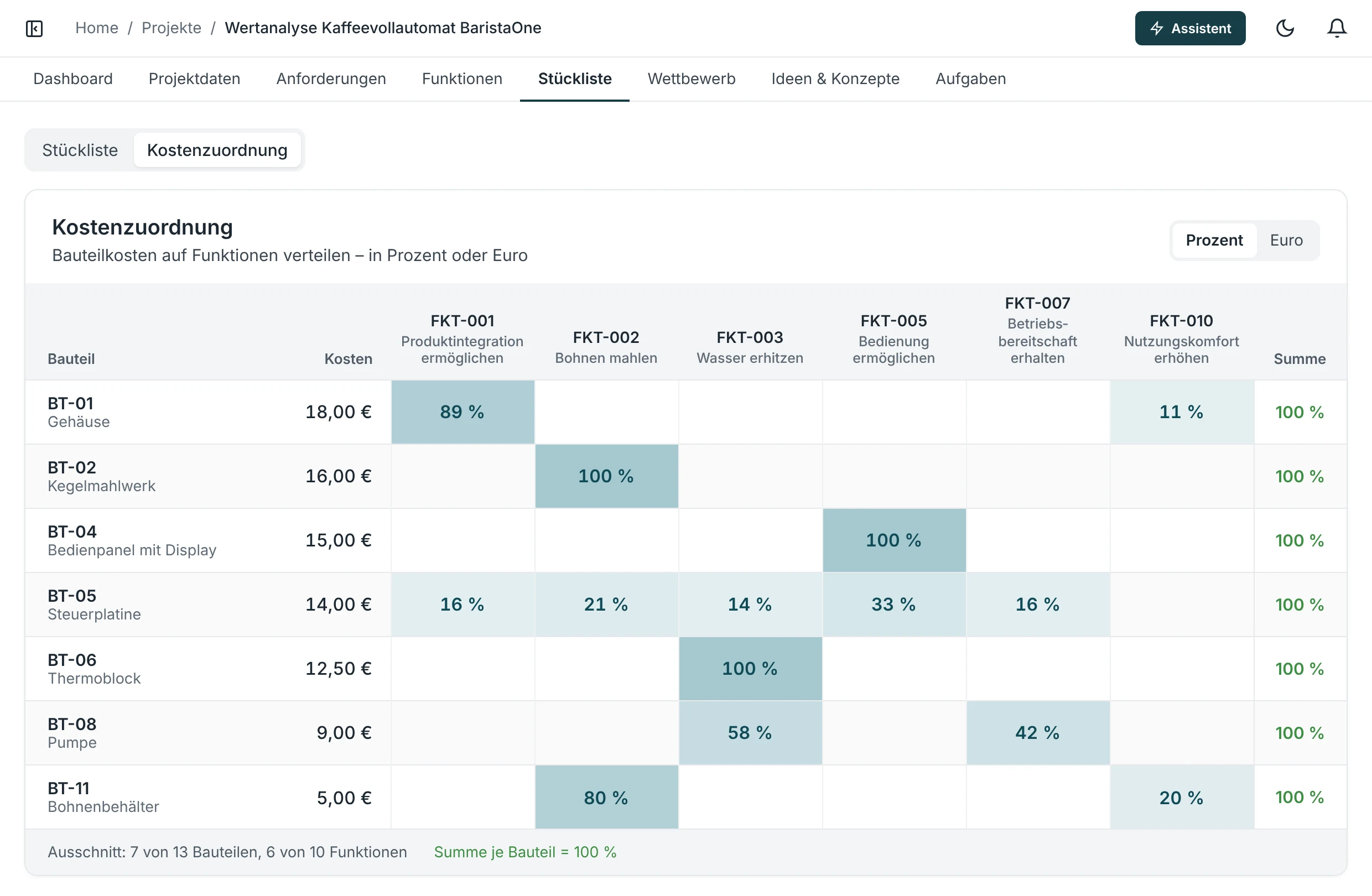
Import the bill of materials and distribute component costs to functions in percent or euros.
Nested BOMCost allocationTarget vs. actual
Compare competitors
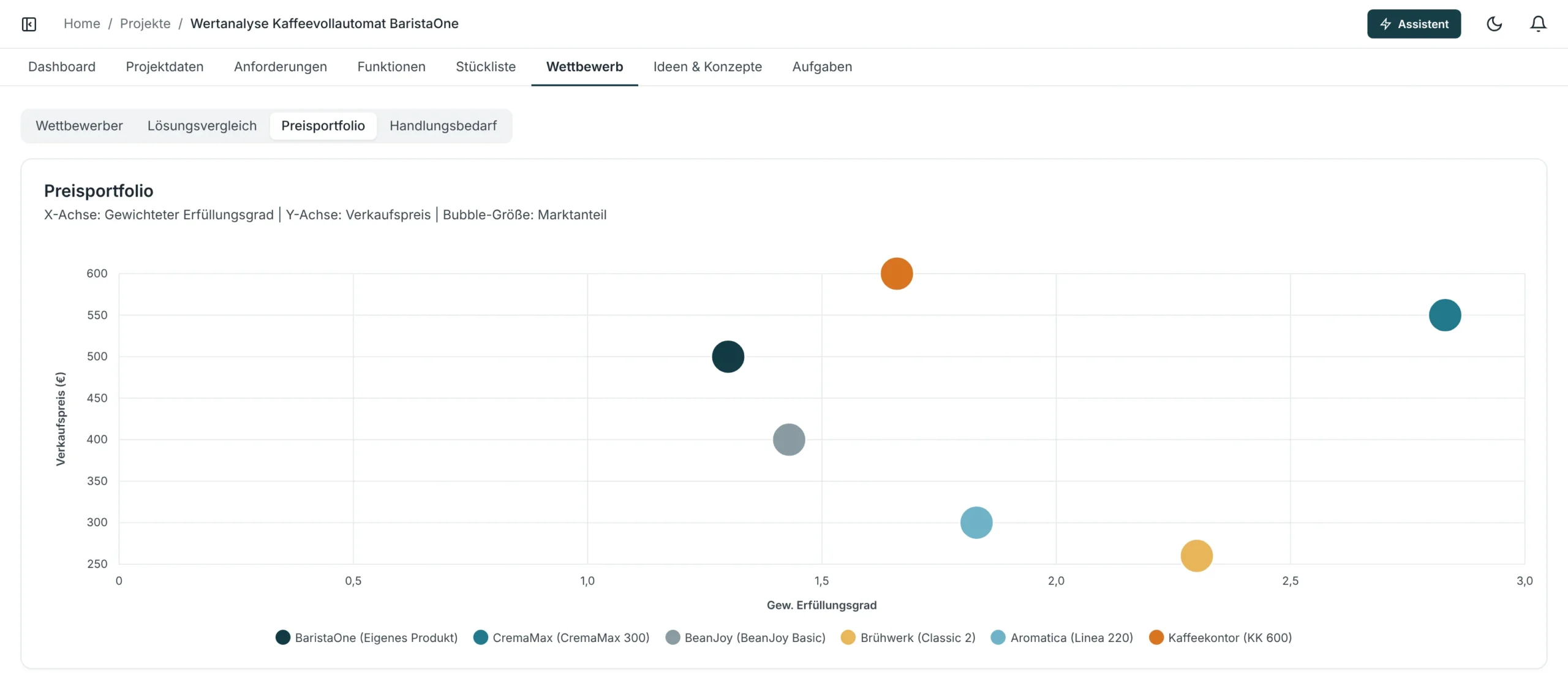
Rate competitors’ solutions per requirement and see where action is needed and where you can differentiate.
Solution comparisonPrice portfolioDifferentiation opportunity
Realise potential
Action areas are created automatically. Rate ideas, bundle them into solution concepts and implement them through tasks.
Action areasSolution conceptsPaybackTasks
From customer wish to solution concept
Example project: coffee machine BaristaOne (fictitious values)
1Requirement
Weighting by pairwise comparison
“Milk specialities” gets 27 %, “Quiet operation” only 3 %.
2Function
Target costs from the weighting
“Froth milk” should carry 15 % of manufacturing costs – today nothing goes into it.
3Action area
Created automatically, competition checked
Two competitors already offer milk froth in their base model.
4Solution concept
Concept “Basic”: integrated milk nozzle, no cup warmer, standard pump
Fixed costs €37,000
Payback: 10.1 months
Still traceable months later.
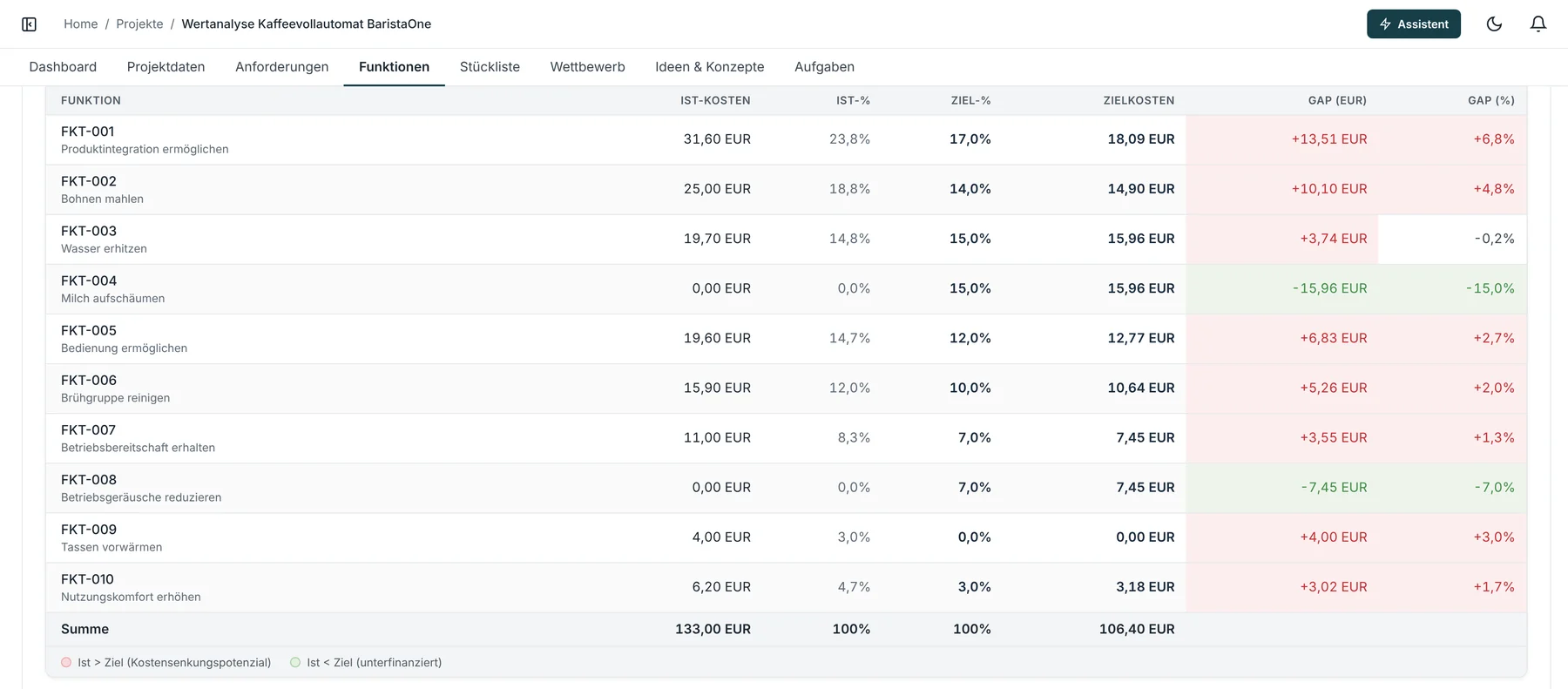
See where costs create no value.
- Function whiteboard: Build the function tree visually – create cards, connect them, arrange them automatically.
- Target costs per function: Set them as an amount or as a percentage reduction. ValueTracker distributes the budget according to customer importance.
- Target vs. actual: Where does a function cost more than it is worth to the customer – and where does the customer expect more?
Source: VDI-Gesellschaft Produkt- und Prozessgestaltung (ed.): Wertanalyse – das Tool im Value Management, 6th ed., Springer 2011, p. 8
From idea to decision.
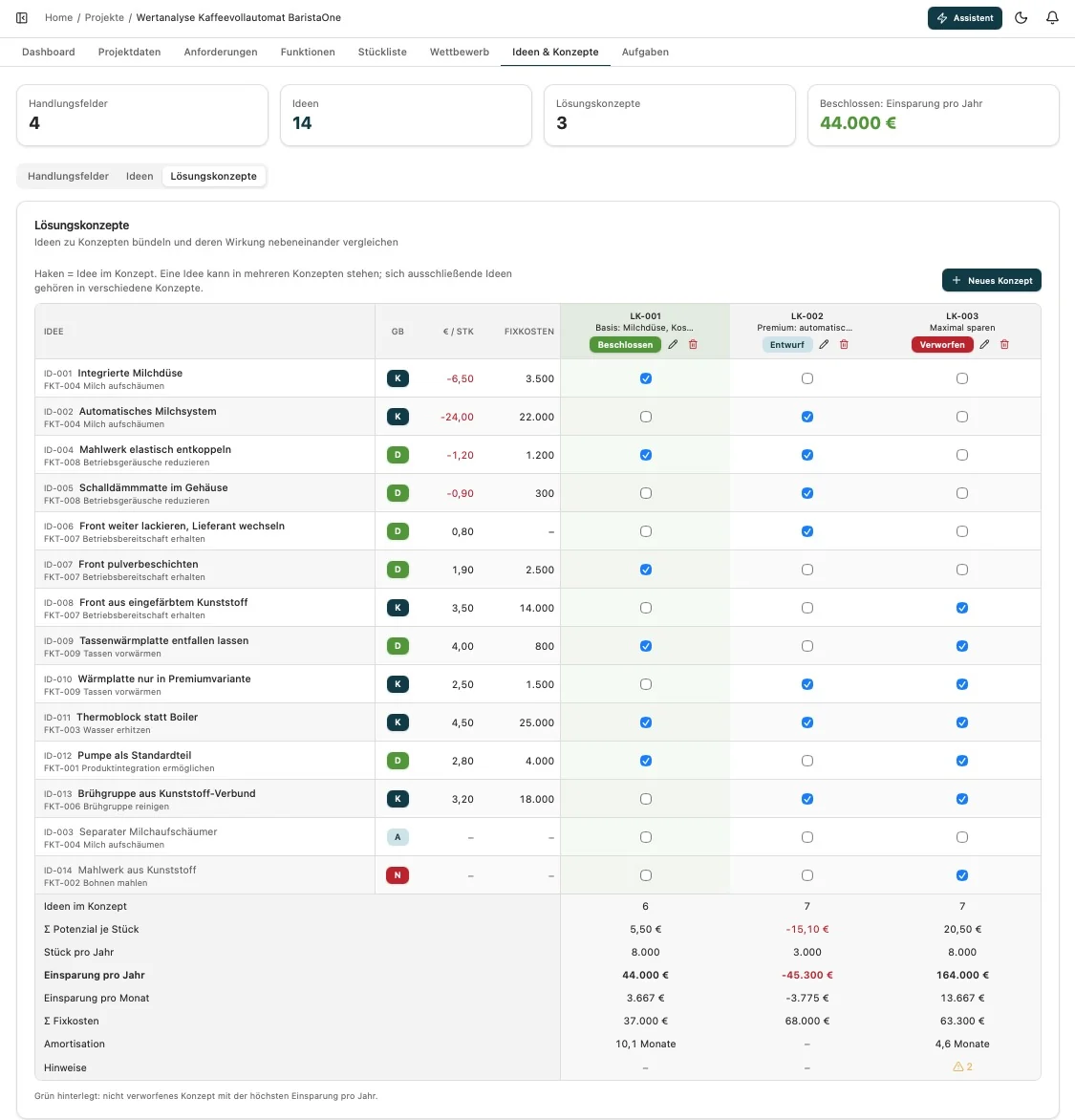
- Rate ideas: Rough assessment, savings potential per unit and fixed costs per idea.
- Build solution concepts: Bundle ideas in a matrix – including alternative variants side by side.
- Economics at a glance: Savings per unit and per year, fixed costs and payback.
- Implement as a team: Tasks attached directly to ideas, “My tasks” across all projects, notifications by e-mail as well.
| Basic ★ | Premium | Maximum savings | |
|---|---|---|---|
| Savings per unit | 5,50 € | −15,10 € | 20,50 € |
| Savings per year | 44.000 € | −45.300 € | 164.000 € |
| Fixed costs | 37.000 € | 68.000 € | 63.300 € |
| Payback | 10.1 months | – | 4.6 months |
| Status | Approved | Draft | Rejected |
Guided or direct. Your team decides.
Two views on the same data – changes are visible in both immediately.
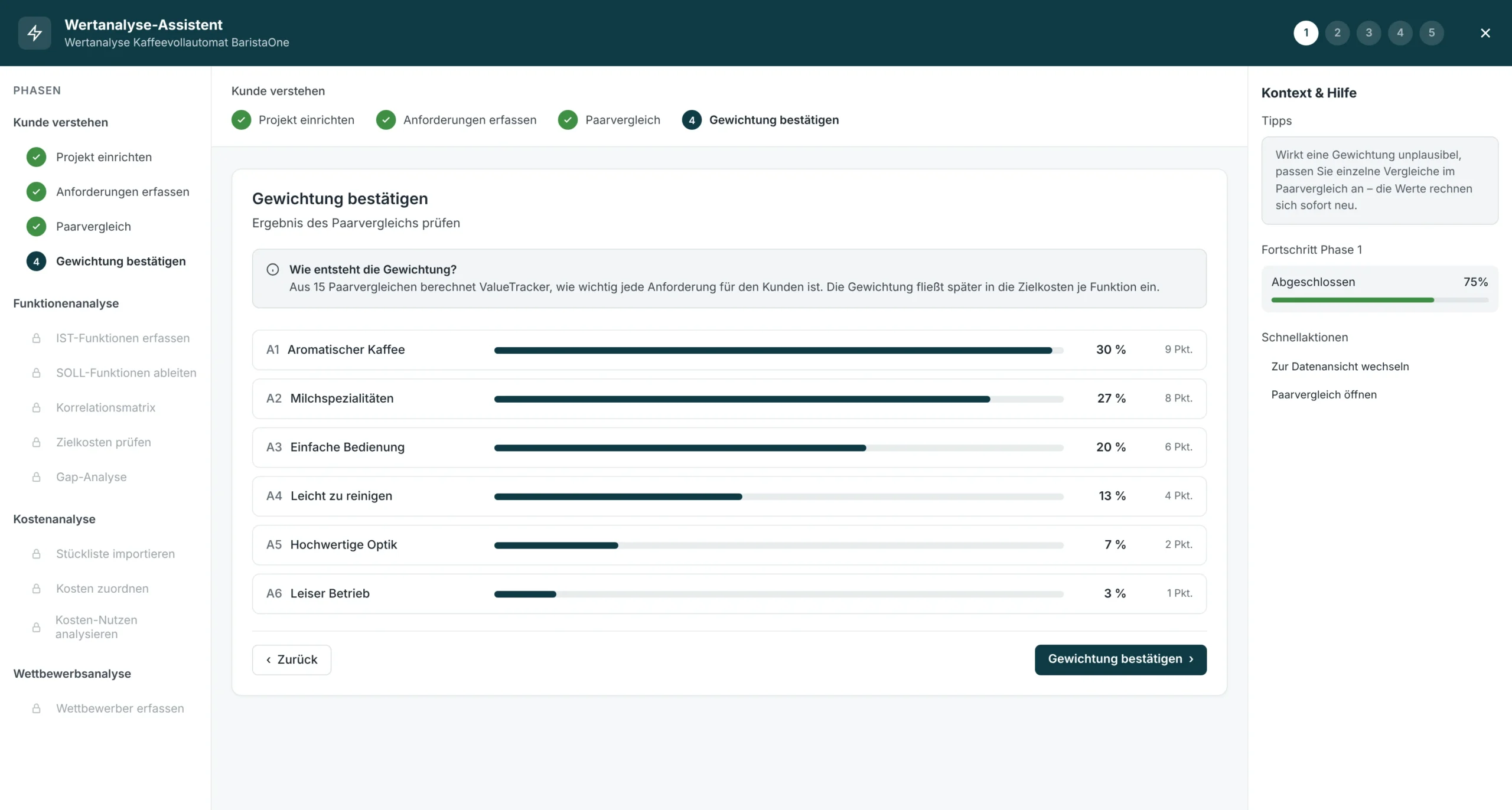
Assistant
19 guided steps with explanations – ideal for workshops and newcomers to the method.
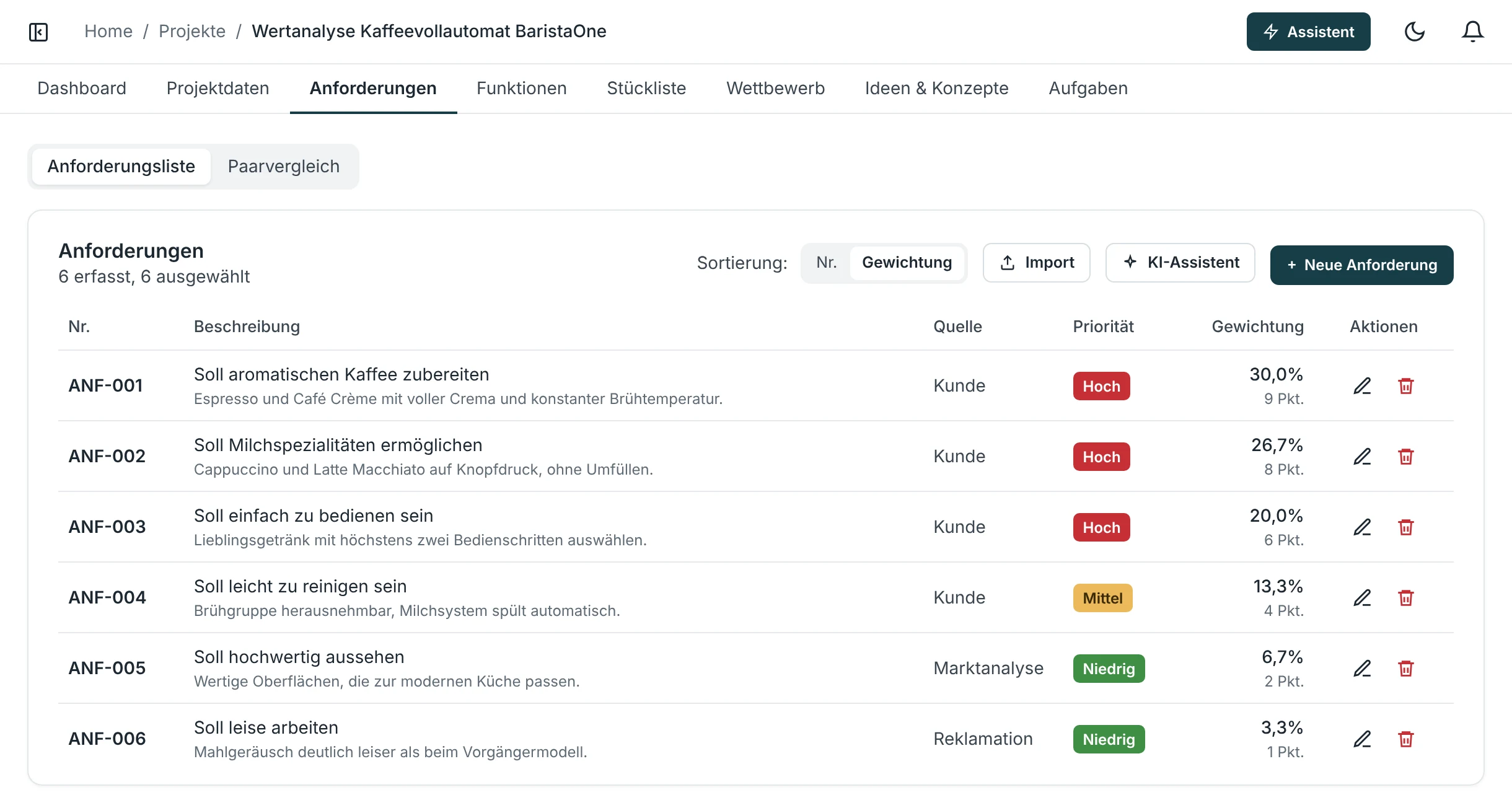
Data view
All tables, matrices and the whiteboard freely accessible – for experienced value analysts.
AI that prepares.
Not decides.
- Customer requirements: Suggestions based on the object of analysis, the project description and requirements already captured.
- Functions: Suggestions including an estimate of how strongly they contribute to each requirement.
- Your AI, your decision: Connect an AI endpoint of your choice – ideally your company’s own AI.
Everything is a draft – only what your team confirms is adopted.
Ready to go in minutes.
- Excel and CSV import: Bring in requirements, functions, BOMs and competitors – with a downloadable template.
- In the browser: No installation, no CAD or PLM project up front.
Your data stays your data.
The whole team. No licence barrier.
Value analysis thrives on interdisciplinary teams – that is why participants are free and unlimited in every plan.
Starter
For getting started with digital value analysis.
490 € / month · annual subscription
| Project lead seats included | 3 |
| Additional project lead seats | + €110 / seat / month |
| Participants | Free, unlimited |
| Active projects included | 3 |
| Additional active projects | + €50 / project / month |
Professional
For teams running several projects in parallel.
790 € / month · annual subscription
| Project lead seats included | 5 |
| Additional project lead seats | + €110 / seat / month |
| Participants | Free, unlimited |
| Active projects included | 6 |
| Additional active projects | + €50 / project / month |
Consultant
For consultants and facilitators with many projects.
850 € / month · annual subscription
| Project lead seats included | 5 |
| Additional project lead seats | + €110 / seat / month |
| Participants | Free, unlimited |
| Active projects included | 8 |
| Additional active projects | + €50 / project / month |
All prices excl. VAT.
Project lead
Creates and steers projects, manages participants and dates.
Participants
Free and unlimited – views the project and works on their own tasks.
Flexible to extend
Add project lead seats and active projects at any time.
Frequently asked questions
Do I have to use the AI?
No. The AI is optional. Every phase can be completed entirely without AI.
Which AI is used?
The one you choose. ValueTracker connects to an AI endpoint of your choice – ideally your company’s own AI.
Can I import existing data?
Yes. Requirements, functions, BOMs and competitors can be imported from Excel or CSV.
Which standards does ValueTracker support?
The workflow follows VDI 2800 and DIN EN 12973; function analysis follows VDI 2803.
What does a participant cost?
Nothing. Participants are free and unlimited in every plan.
Where is my data stored?
In ISO 27001 certified data centres in Germany, GDPR compliant and in a separate, isolated area for each company.
Do I need prior knowledge of value analysis?
No. The assistant guides you through the method in 19 steps.
Experience ValueTracker live.
In a personal demo we show you how your next value analysis project becomes simpler, more transparent and faster.
- Free and without obligation
- Online, approx. 30–60 minutes
- Personal reply within one working day
Developed by Calidat – the team behind QTRIX, used by companies such as Hilti, Miele, Bosch and Liebherr.

A product of Calidat GmbH
Moltkestr. 137 · 50674 Cologne
Calidatcalidat.comQTRIXContact